Posts

Showing posts with the label kanji-recognizer

Kanji Recognizer v2.2 Released
Image
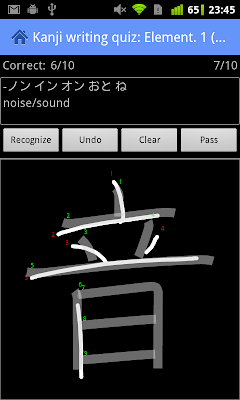
After a long break, a new Kanji Recognizer version is now available on Google Play . This release introduces a new quiz training mode and adds some further UI improvements, courtesy of ActionBarSherlock . One of the most popular features of the app is the kanji writing quiz. In the standard quiz mode, you are presented with the kanji's reading and English meaning (optional) and based on this information you have to recall the corresponding kanji and write it correctly. The quiz evaluates your input and keeps track of which characters you miswrote.This is a helpful tool for testing characters you already know, but it is only effective if you are fairly confident in your knowledge for the  particular level. If you can't remember a kanji, you need to skip it and can see the proper stroke order only after the quiz is over. To help you practice characters you haven't yet mastered, the new version introduces a training mode. If you select the training mode option in the quiz co...

New Handwriting Recognizer Site

Image
The previously announced gift coupon page  for Kanji and Hanzi Recognizer has been renewed and expanded into a full-featured website. It now has dedicated pages for both apps  that introduce each app's features, detail requirements and, most importantly, explain how to get and install the app. Direct downloads are now provided, making it easy to install the apps on devices without the Android Market, and in countries where they are not available. Unfortunately, the Android Market treats free apps with the ability to upgrade via an in-app purchase as paid apps, and thus they are unavailable in countries that don't support Market purchases. There are still quite a few unsupported countries, including major app consumers such as Taiwan . The new site should make it easier for people in those countries to find and use the apps. And hopefully decipher some Chinese characters on the go :) Here's how the site looks: If the design looks familiar, it's because it uses the...

Gift Coupons for Kanji/Hanzi Recognizer

Image
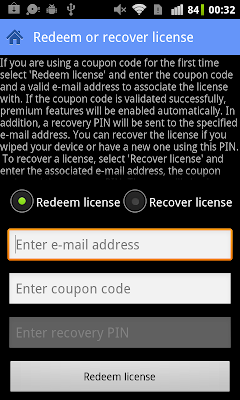
Ever wanted to give and Android app as a gift? Unfortunately, this is not supported by the Android Market, so unless you are willing to share your Google Wallet account, you currently can't do this for most apps. Kanji Recognizer and Hanzi Recognizer are however special: it is now possible to buy an upgrade coupon code and give it as a gift. As of version 2.1, both apps support upgrading via coupon codes, as well as directly through the Android Market. If you just want to upgrade on your own device, the fastest way is to open Settings, and hit 'Upgrade to premium' (as before). After you authorize the payment using the Android Market dialog, all premium features will be enabled within seconds. To get a gift coupon code on the other hand, visit this page , select an app and login with your Google account. Then just enter your email address and press the 'Buy' button. Since payments are handled through Google Wallet, just as on Android, no registration or entering o...

Kanji Recognizer v2.1 Released

Image
The newest version is now available on the Android Market . This release brings a slightly more polished UI, some convenient new features and support for upgrading using coupon codes. The action bar pattern was introduced in version 2.0  for both tablets and phones, but action item icons depended on the OS version. This release bundles a set of common icons (created with the excellent Android Asset Studio ), that should make the look and feel of the app consistent across different devices and Android versions. Here's how the main screen looks like with the new action bar icons: Kanji Recognizer has supported copying and appending recognized characters to the clipboard for use in other apps since the very first version. However, sending character data to other apps using Android's native sharing functionality was missing. This version (finally) corrects that. You can now send characters (kanji, reading and meaning) to any app that accepts text data. One thing to note is th...

Kanji Recognizer v2.0

Image
It's been a while since the last release, but the latest version is finally available . The focus of this release is an improved new UI and full support for tablets. The app is now using an action bar for easier access to key functionality .  This is a feature originally only available on the Honeycomb (3.x) and Ice Cream Sandwich (4.0) Android versions, but Kanji Recognizer uses the excellent ActionBarSherlock  library to bring ot bar to previous versions as well. Functions that were previously only accessible via the overflow menu (displayed when you press the menu key), now have an icon on the action bar. That will hopefully make it easier for new users to find and try them. Here's how the main screen looks in version 2.0: The three icons on the right side of the action bar start the quiz, character search and history/favorites screens, respectively. Less frequently used features, such as the Settings and About screens are still in the overflow menu,  ...

Kanji Recognizer 1.7 Released

Image
This blog post is a little late, but Kanji Recognizer 1.7 (and soon after 1.7.1) is now available in the Android Market . This release introduces two major new features: multiple character input via the Simeji mushroom, and stroke order diagrams in character details, as well as a number of improvements and bug fixes. Multiple character input has been one of the most often requested features since the introduction of Simeji mushroom support in 1.5. While you had to call Kanji Recognizer from Simeji for each character you needed to input before, now you can input a string of characters with a single invocation. After you select a character from the candidates list, it is added to the input buffer and the drawing area is automatically cleared. You can add as many characters as you want, and return the string to Simeji by pressing the green tick icon on the right. If you want to clear the buffer and start over, you can press the cross icon. As before, this is a premium feature...

Kanji Recognizer & Hanzi Recognizer 1.6 Released

Image
The new versions up of Kanji Recognizer (1.6.3) and Hanzi Recognizer  (1.6) are now available in the Android Market. The major feature of this release is search on stroke. While you had to draw the whole character, and then press the 'Recognizer' button in previous releases, now the list of candidates is updated automatically as you add or remove strokes. This gives you immediate feedback and is particularly valuable  when you are not sure of the number and order of strokes in a character. On the flipside, it requires some processing power, so on older devices it may not work smoothly. If recognition is slow on your device, you can switch to the previous list view mode in Settings. That, of course, is not all. Here's a list of all the new features and changes: Drawing pen size and color are no adjustable. You can select any color with the built-in color selector (added in 1.6.3 for Kanji Recognizer). Shake to delete stroke/clear all. A simple shake will delete the l...

Kanji Recognizer 1.5 Released

Image
The newest version is available on the Android Market now.  This is the first release to offer premium features. To unlock those, you can upgrade from within the application using Google Checkout. There is no need to download a separate 'pro' application. The new premium features are: Favorites and history: kanji you view are automatically saved to search history. You can mark any kanji as favorite to review later with a single tap. Favorites export to Excel (CSV): export all fields displayed in the details screen as CSV columns. You can edit or print the exported file on your PC, or import it in other programs such as Anki. Simeji integration (mushroom): lets you draw a kanji and insert it into the text you are typing using Simeji, OpenWnn/Flick, ATOK or OpenWnn Plus without leaving the current application (Simeji/OpenWnn/ATOK IME installiont required). Search by character, reading or meaning: quickly lookup kanji by reading or English mean...