Posts

Showing posts with the label wwwjdic

WWWJDIC for Android 2.2
Image
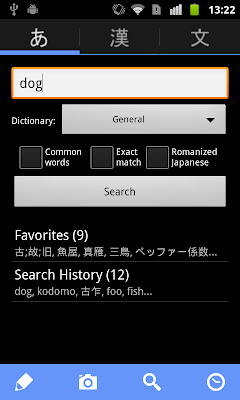
After a long break, a new version of WWWJDIC for Android is available on the Android Market Google Play . The new release comes with a new UI and a fresh set of icons, support for more dictionaries and widget improvements. It also marks 2 years since the first public release (0.1). Once again , WWWJDIC makes use of the excellent ActionBarSherlock  library to make app features more accessible and easier to use. ActionBarSherlock 4.0, based on Ice Cream Sandwich (ICS) source code, backports all features of the action bar found in Android 4.0 to Android 2.x and 3.x devices. Of those, the one most prominently used in WWWJDIC is the split action bar. Android's action bar can host multiple action buttons to let users easily access app features, but on handset screens the number of buttons is limited to 2 or at most 3, in order to leave some space for the activity icon and title. Actions that don't fit in the action bar are by default moved into the overflow menu. Since they ar...
WWWJDIC for Android 2.1 Released

Image
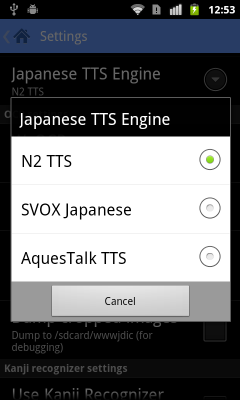
The newest release is now live in the  Android Market . The highlights of this version are improved Japanese text-to-speech (TTS) and Android 4.0 (Ice Cream Sandwich, ICS) support. Version 2.0 introduced Japanese TTS support using the free N2 TTS speech engine, but apparently (and unfortunately) it is not available from the Android Market outside of Japan. In 2.1 I've added support for two other major Japanese TTS engines:  SVOX Japanese  and  AquesTalk TTS . You can now switch the Japanese TTS engine in the Settings screen, check out the screenshot below. The app doesn't check if the engine is actually installed, so you should install the relevant TTS package before changing the setting (if you select an engine that is not available, Japanese TTS support will be disabled throughout the app). Another improvement in this release: the settings screen is now using an action bar, courtesy of  ActionBarSherlock  v3.4.0. Unfortunately, an API to list ava...

WWWJDIC for Android 2.0

Image
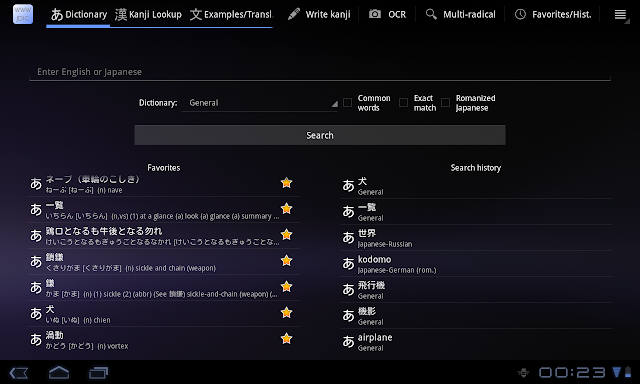
More than a year and a half since the initial release to the Android Market, WWWJDIC for Android's second major version update is now live. It brings a refreshed UI for phones, a fully optimized and easier to use interface for tablets, and one of the most often requested features -- Japanese text-to-speech. Get it now from the Market  and read about what's new and improved below. First thing, first: tablets. The tablet-optimized version of Android, Honeycomb, was released early this year, but affordable Android tablets are just now getting mainstream. The biggest user visible changes are the introduction of the action bar on the top, and the fixed system bar with soft back and home buttons at the bottom of the screen. And, of course, the obviously larger screen. To take advantage of those, Honeycomb apps move previously hard to find option menus to the easily accessible action bar, and display more information when more screen real estate is available. Here's how the main...

WWWJDIC for Android 1.8.7 Released

Image
The latest version is now available in the Android Market  and soon in the Amazon Appstore. Example search has been largely improved by using a feature recently added to  WWWJDIC 's API . While clicking on the 'Ex.' button next to a dictionary entry would only show you sentences containing the exact word before, searching for examples is a lot 'smarter' now. It now matches inflected words, alternative spellings and more. For example, searching for 飲む will match 飲んだ, as well as のまない; searching for 綺麗 will match きれい, キレイな, as well as the original 綺麗, of course. Up to 100 sentences matching the query will be returned by default. For common words, you might want to turn the 'Random examples' option in Settings on. If you do, you will get 10 random examples containing the target word each time you search, giving you a much broader view of the word's usage. Another new feature in this release is support for optical character recognition (OCR) of gallery im...

WWWJDIC for Android v1.8.4 Released

A new version is now available in the Android Market , as well as the Amazon Appstore . This update doesn't add new features, but includes a critical change: support for the new WWWJDIC Japan mirror . The current one will be closing tomorrow (6/30), so if you are in Japan, or using the Japanese mirror site, update now. Another change in this release is improved display of kanji grade/type in the details view. Previous versions displayed the raw KANJIDIC grade number (1-10), the new one properly classifies the kanji, displaying 'Elementary 1-6' for kanji studied in Japanese elementary school, 'Secondary' for kanji studied in the chuu-gakko (junior high school), and 'Jinmenyou' for additional kanji used in Japanese names. Other notable changes are listed below. Head over to the project's website for even more details . stability improvements better error reporting various bug fixes Coming up soon: new Kanji Recognizer version with exciting ne...

WWWJDIC for Android v1.8.3 Released

Image
The new version is now available in the Android Market and soon in the Amazon Appstore. If you don't have access to either of those, you can get it from the downloads section of the project's website . This versions adds support for the new JLPT levels (N1-5), both in the kanji details view and in the kanji of the day widget. You can now limit the kanji displayed by the widget to one of the 5 test levels. Here's how the widget configuration screen looks now: Another major improvement in this release is the handling of kanji search by English meaning. Not all relevant entries were returned before, and that has now been fixed. You should get the same results as from the original WWWJDIC . Other notable changes in the previous two releases (1.8.1 and 1.8.2) are listed below. For more details refer to the full changelog. Use the new WWWJDIC dictionary codes (for non-English dictionaries) Save TTS languae in history/favorites OCR error handling improvements Automatical...

WWWJDIC for Android 1.8 Released

Image
The new version is now available in the Android Market  and the Amazon Appstore . The major feature added in this release is text-to-speech (TTS) for kanji (English) and dictionary entry translations (English/German/French/Spanish). Each kanji or dictionary entry translation now has a little speaker button on the right, pressing it will pronounce the translation. Uses the Android text-to-speech service, you'll need to install the data files if not already installed. Unfortunately, Android's TTS service does not support Japanese, and there are no free Japanese TTS extensions. Google Translate uses an unofficial text-to-speech Web API that does feature Japanese, but it is not yet available for third party developers. So, at least for now, TTS for Japnese is not supported. Here's the obligatory screenshot: