Posts

Gift Coupons for Kanji/Hanzi Recognizer
Image
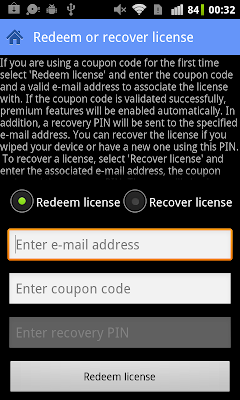
Ever wanted to give and Android app as a gift? Unfortunately, this is not supported by the Android Market, so unless you are willing to share your Google Wallet account, you currently can't do this for most apps. Kanji Recognizer and Hanzi Recognizer are however special: it is now possible to buy an upgrade coupon code and give it as a gift. As of version 2.1, both apps support upgrading via coupon codes, as well as directly through the Android Market. If you just want to upgrade on your own device, the fastest way is to open Settings, and hit 'Upgrade to premium' (as before). After you authorize the payment using the Android Market dialog, all premium features will be enabled within seconds. To get a gift coupon code on the other hand, visit this page , select an app and login with your Google account. Then just enter your email address and press the 'Buy' button. Since payments are handled through Google Wallet, just as on Android, no registration or entering o...

Hanzi Recognizer v2.1

Image
The latest version is now live on the Android Market . This release shares some basic features with Kanji Recognizer v2.1  and offers improved compounds search. The app has a new set of action bar icons, consistent across Android versions. The main screen now looks like this: Version 2.1 also adds support for native Android sharing and a new icon for copying, see the Kanji Recognizer post for details. Another common feature, that we will present in a bit more detail here, is support for direct export to an Anki deck.  Anki  is a flashcard application that employs the  spaced repetition  learning technique which has been proven very effective for vocabulary acquisition. Besides managing your flashcards, Anki automatically decides when to present a particular flashcard based on feedback from the user, thus greatly optimizing the learning experience. Applications are provided for both desktop (Windows/Mac/Linux), mobile ( Android /iPhone) and th...

Kanji Recognizer v2.1 Released

Image
The newest version is now available on the Android Market . This release brings a slightly more polished UI, some convenient new features and support for upgrading using coupon codes. The action bar pattern was introduced in version 2.0  for both tablets and phones, but action item icons depended on the OS version. This release bundles a set of common icons (created with the excellent Android Asset Studio ), that should make the look and feel of the app consistent across different devices and Android versions. Here's how the main screen looks like with the new action bar icons: Kanji Recognizer has supported copying and appending recognized characters to the clipboard for use in other apps since the very first version. However, sending character data to other apps using Android's native sharing functionality was missing. This version (finally) corrects that. You can now send characters (kanji, reading and meaning) to any app that accepts text data. One thing to note is th...

Using a Custom Certificate Trust Store on Android

Image
As mentioned in a previous post , Android 4.0 (ICS) adds both a system UI and SDK API's that let you add certificates to the system trust store. On all previous version though, the system trust store is read-only and there is no way to add certificates on non-rooted devices. Therefore, if you want to connect to a server that is using a certificate not signed by one of the CA's included in the system trust store (including a self-signed one), you need to create and use a private trust store for the application. That is not particularly hard to do, but 'how to connect to a server with a self-signed certificate' is one of the most asked Android questions on StackOverflow , and the usual answer goes along the lines of 'simply trust all certificates and you are done'. While this will indeed let you connect, and might be OK for testing, it defeats the whole purpose of using HTTPS: your connection might be encrypted but you have no way of knowing who you are talking to...

Using ECDH on Android

Image
Elliptic curve cryptography ( ECC ) offers equivalent or higher levels of security than the currently widely deployed RSA and Diffie–Hellman  (DH) algorithms using much shorter keys. For example, the computational effort  for cryptanalysis of a 160-bit ECC key is roughly equivalent to that of a 1024-bit key (NIST). The shift to ECC has however been fairly slow, mostly due to the added complexity, the need for standardization, and of course, patents. Standards are now available (more than a few, of course) and efficient implementations in both software and dedicated hardware have been developed. This,  along with the constant need for higher security, is pushing the wider adoption of ECC. Let's see if, and how we can use ECC on Android, specifically to perform key exchange using the ECDH (Elliptic Curve Diffie-Hellman) algorithm. Android uses the Bouncy Castle  Java libraries to implement some of its cryptographic functionality. It acts as the default JCE...

Hanzi Recognizer v2.0 Released

Image
The latest version is now available in the Android Market . There are no new user visible features, but the  renewed UI and full support for tablets warrant the major version bump. Hanzi Recognizer now has an app-wide action bar, available both on the newer Ice Cream Sandwich (4.0) and Honeycomb (3.x) Android versions, and on all mainstream Android 2.x versions. Functions previously only accessible via the overflow menu are now easier to use and discover courtesy of the action bar. Here's a screenshot of the app's main screen: The two icons on the right kick off the keyword (reading or meaning) search and the favorites/history screen, respectively. All other screens have a home icon on the left as well, providing an easy way to get to the main screen from anywhere. Less frequently used activities such as Settings and About are available via the Menu key, as before. The favorites and history tabbed screen now has a new look, consistent with the Honeycomb and ICS visual...

ICS Trust Store Implementation

Image
In the previous two   posts we looked at the internal implementation of the Android credential storage, and how it is linked to the new KeyChain API introduced in ICS. As briefly mentioned in the second post, there is also a new TrustedCertificateStore class that manages user installed CA certificates. In this entry we will examine how the new trust store is implemented and how it is integrated in the framework and system applications. Storing user credentials such as passwords and private keys securely is of course essential, but why should we care about the trust store? As the name implies, the trust store determines who we trust when connecting to Internet servers or validating signed messages. While credentials are usually used proactively only when we authenticate to a particular service, the trust store is used every time we connect to a secure server. For example, each time you check GMail, Android connects to Google's severs using SSL and validates their certificates b...